Save web video, sound and full-size images — right in your browser.
MediaJar finds the media a page plays — files, HLS and DASH streams — joins separate picture and sound into one clean MP4, and saves images at the largest size the site offers. No companion app. No account. No tracking.
- Manifest V3
- Processing stays on your computer
- No watermarks or daily limits
Three clicks, no setup
MediaJar works with what your browser already loads — there is nothing to configure.
Play the video
Open a page and start the video or audio. MediaJar notices the streams as they load.
Open MediaJar
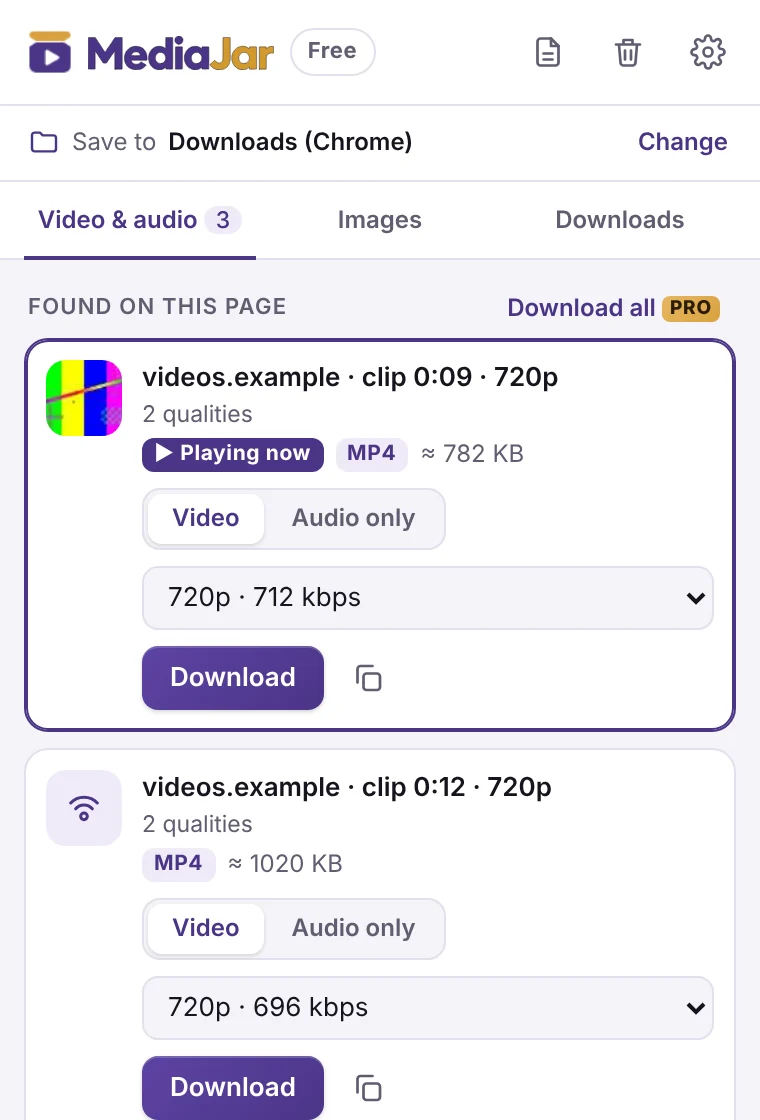
The clip that is playing right now is marked and shown first, with a frame preview and its qualities.
Save
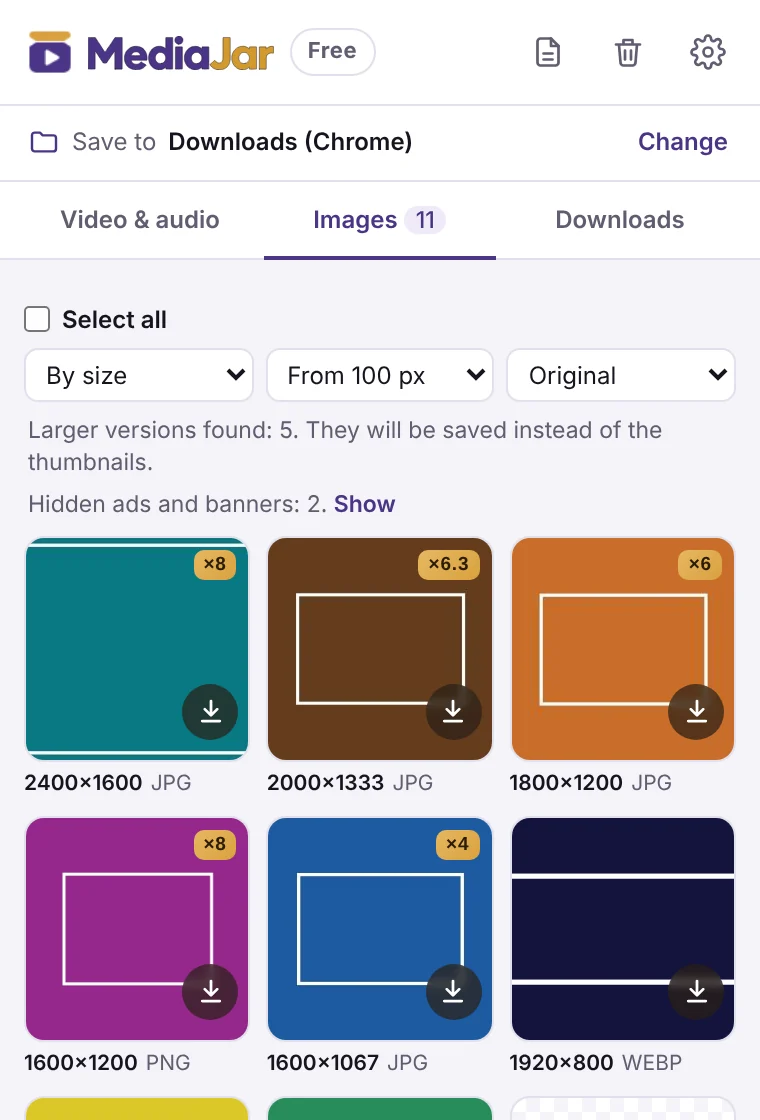
Pick a quality and press Download — or switch to Images and save the originals.
Why MediaJar
One small popup instead of a video downloader, an image grabber and a converter.
No companion app
Separate DASH video and audio are joined, and HLS (.ts) is repacked into MP4, directly in your browser. Nothing to install on your computer, and no re-encoding — you get the original quality.
Full-size originals, not thumbnails
MediaJar looks for the largest copy the server provides and shows how much bigger it is (×4, ×8…). Pro saves a whole page as one ZIP and turns WebP / AVIF into JPG or PNG.
Knows what is playing
On pages with endless feeds the clip you are watching is highlighted with a real frame, so you never have to guess which file is which. Ads are left out.
Private by design
No sign-up and no browsing telemetry: we never see which pages you visit or what you save. Your license key is checked on your computer and syncs through your browser profile.
Free covers the everyday. Pro saves you time.
The free version has no ads, watermarks or daily limits. Pro adds 4K, batch work and automation.
| Feature | Free | Pro PRO |
|---|---|---|
| Video & audio | ||
| Find video and audio on the page: files, HLS and DASH streams | ✓ | ✓ |
| Quality up to 1080p | ✓ | ✓ |
| 1440p and 4K | — | ✓ |
| Join separate picture and sound into one MP4 — no re-encoding | ✓ | ✓ |
| Sound only, when the site serves it as a separate track | ✓ | ✓ |
| Sound only from any video (.m4a / .mp3) | — | ✓ |
| Record live streams (HLS) | up to 10 min | no limit |
| Subtitles provided by the site, as .srt / .vtt | — | ✓ |
| “Download all” from a page in one click, skipping what you already saved | — | ✓ |
| Images | ||
| Largest version the site offers instead of the thumbnail | ✓ | ✓ |
| Save pictures one by one | ✓ | ✓ |
| Save many pictures as one ZIP | — | ✓ |
| Convert WebP / AVIF to JPG or PNG | — | ✓ |
| Size filter | from 100 px | any size |
| Files & workflow | ||
| Rename before saving, subfolder in Downloads | ✓ | ✓ |
| File-name templates: {title}, {site}, {date}, {quality}… | — | ✓ |
| Save straight into a folder of your choice, no dialogs | — | ✓ |
| Export the list of found media to CSV / JSON | — | ✓ |
| No ads, watermarks, account, daily limits or speed caps | ✓ | ✓ |
Simple pricing
Pick what fits: a pass for one project, a yearly plan, or pay once and keep Pro.
1 Month Pass
One-time payment
30 days of full Pro. No auto-renewal, no recurring charges — handy for a one-off project.
Buy 1 monthAnnual Pro
Subscription, billed yearly
Full Pro with every update. Cancel anytime from your receipt email — Pro stays on until the paid year ends.
Subscribe yearlyLifetime Pro
One-time payment
Pay once, use Pro for the lifetime of the product, with all future updates. Early-adopter price for the first 300 lifetime licenses.
Buy LifetimePrices in USD. At checkout Paddle shows your final price in your local currency, including any applicable VAT or sales tax. Your license key arrives instantly by email. 14-day money-back guarantee. Try Pro first: 10 free Pro actions, no card needed.
Made for content you are allowed to save
MediaJar is a technical utility for saving publicly accessible media and images that you already have permission to view and keep. It does not bypass DRM, paywalls or other protection, and it does not download from YouTube, in line with Chrome Web Store policies. You are responsible for having the rights or permission to save the content.
Questions
Which sites does it work on?
Most sites that play video, audio or images in the browser in standard formats (MP4, WebM, MP3, HLS, DASH, JPG, PNG, WebP, AVIF). Sites change often; when something stops working, write to us and we fix it.
Are videos re-encoded?
No. MediaJar saves the original stream and only repacks it into an MP4 container when needed, so quality is exactly what the site sends.
Do I need an account?
No. The free version needs nothing. Pro is a license key that you paste into the extension’s settings.
Can I try Pro before buying?
Yes: start the free trial in the extension and get 10 Pro actions — for example 10 downloads in 4K or as ZIP. No card needed.